ReactJS Hooks - use Experimental Hook

ReactJS Hooks use [Experimental]
Hello everyone, continuing the series of articles about Hooks, in this article I'll talk about use. A Hook that is in experimental phase and should be available in React soon.
This hook can greatly help our day-to-day because currently the amount of code written to resolve a promise is quite large. But not only that.
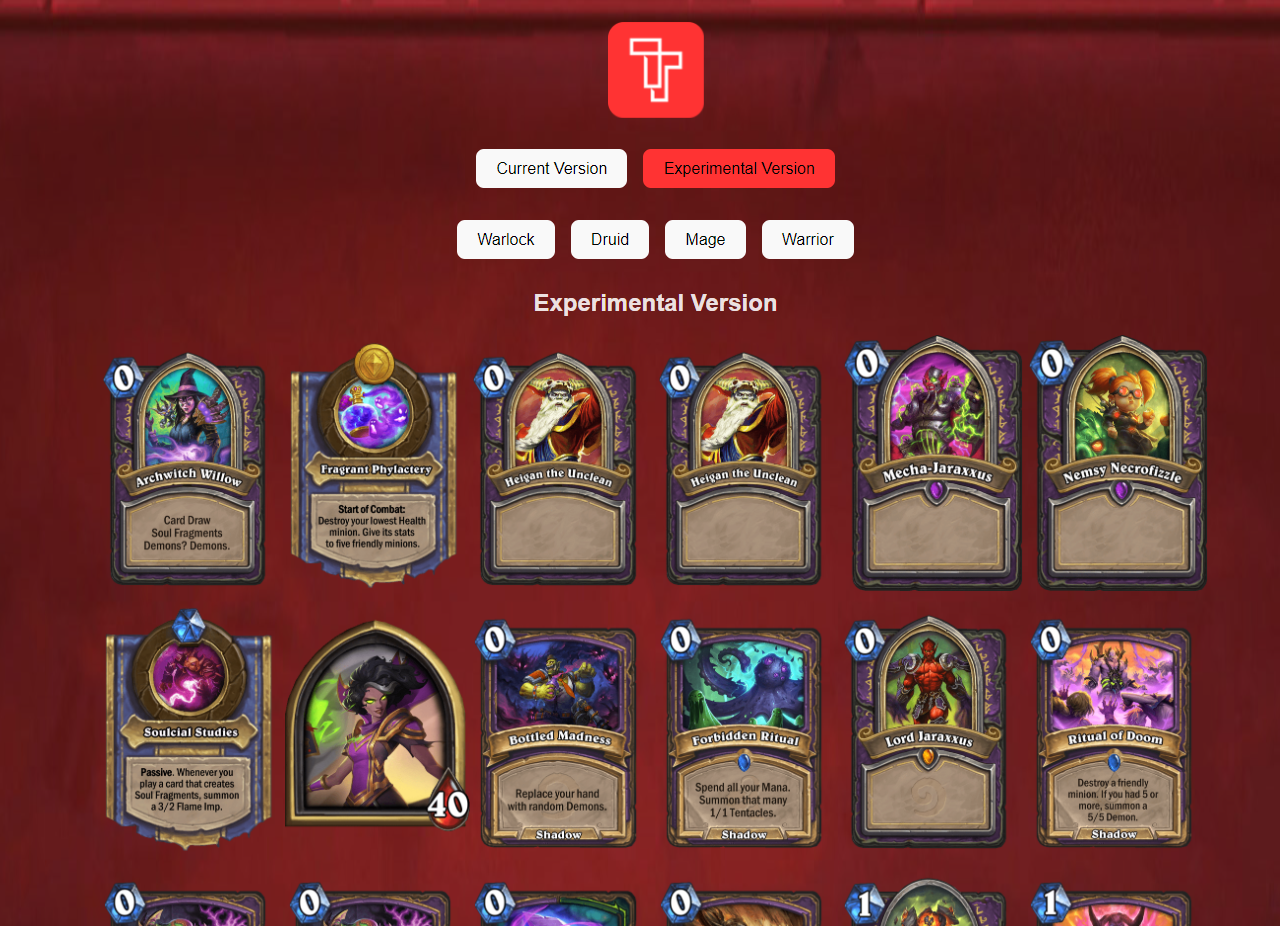
And to demonstrate how the hook works by comparing it with the current state, I created a simple project showing some cards from the Hearthstone game.
If you want to learn a bit more about Hooks, you can read this content here: React Hooks, Introduction
Also learn how the hook useEffect works.
What is RFC?
But before we start the examples I need to explain what an RFC is.
RFC stands for Request for Comments — meaning there is a request for comments on a specific topic. An RFC is a technical document where multiple people can discuss a particular technology, methods, research, ideas, etc. In the case of React there is an open RFC discussing First Class Support for Promises and methods with async/await.
This RFC brings an experimental version of React so the community can use support for resolving a JavaScript promise using React's Suspense. Something that has been anticipated for some time.
What the First Class Support RFC will bring:
- Support for resolving async/await in server-side components. Writing server-side components using the JavaScript
awaitsyntax by defining your component as an async function. - Introduction of the
usehook. Just likeawait,usewill be used with promises, and can be used normally with components and Hooks — even on the client side.
This allows React developers to access data from asynchronous requests with React's Suspense API.
Important: since this version is still in experimental mode and there is ongoing discussion about it, changes may arise — so wait for the final version before using it in production :)
Hands on
Now I'll demonstrate some advantages that the use hook can bring to React development.
I used Vite to create the initial project structure. To do so run the commands below:
$ yarn create vite
Enter the project name or press enter (I called it reactjs-use-hook)
- ReactJS
- TypeScript
// Using Yarn
$ cd reactjs-use-hook
$ yarn add react@experimental react-dom@experimental
or
// Using NPM
$ cd reactjs-use-hook
$ npm install react@experimental react-dom@experimental
Open the tsconfig.json file and add the "types": ["react/experimental"] option so TypeScript recognizes the new Hook.
// tsconfig.json
{
  "compilerOptions": {
    // other options
    "types": ["react/experimental"]
  },
  "include": ["src"],
  "references": [{ "path": "./tsconfig.node.json" }]
}
For the development of this project I used a public Hearthstone API.
Now just run the command below to start the project:
$ yarn dev
So, for comparison purposes, I'll create two versions of this project: the first using useEffect and useState (CurrentVersion.tsx) to handle all asynchronous calls, and the second with the use hook (ExperimentalVersion.tsx).
Structure of the final project:
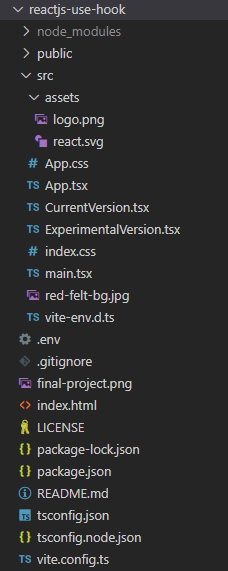
I will not add the .css file structure and assets used in this tutorial.
The files are available in this repository reactjs-use-hook if you want to reproduce the full project.
To start, create a .env file in the root folder containing the HearthStone API keys.
VITE_RAPID_API_KEY=your-api-key
VITE_RAPID_API_HOST=your-api-host
Note: I didn't use my own keys from the repository because they have a daily usage limit and/or may become invalid. So I strongly recommend using your own keys when reproducing this project.
Then modify the App.tsx file, making it look like this:
// App.tsx
import { useState } from "react"
import logo from './assets/logo.png'
import ExperimentalVersion from './ExperimentalVersion'
import CurrentVersion from './CurrentVersion'
import './App.css'

function App() {
  const [version, setVersion] = useState<string>('experimental') // version selection
  const [cardClass, setCardClass] = useState<string>('warlock') // card class selection

  return (
    <div className="App">
      <div>
        <a href="https://tautorn.com.br" target="_blank">
          <img src={logo} className="logo tautorn tech" alt="Tautorn Tech Logo" title="Tautorn Tech Logo" />
        </a>

        <div>
          <button onClick={() => setVersion('current')}>Current Version</button>
          <button onClick={() => setVersion('experimental')}>Experimental Version</button>
        </div>

        <div style={{ margin: '2rem'}}> <!-- I didn't create a class just for convenience in this example, but don't use inline css-->
          <button onClick={() => setCardClass('warlock')}>Warlock</button>
          <button onClick={() => setCardClass('druid')}>Druid</button>
          <button onClick={() => setCardClass('mage')}>Mage</button>
          <button onClick={() => setCardClass('warrior')}>Warrior</button>
        </div>

        {version === 'current' && (<CurrentVersion cardClass={cardClass} />)}
        {version === 'experimental' && (<ExperimentalVersion cardClass={cardClass} />)}

      </div>
    </div>
  )
}

export default App
In the file above I use two imports import ExperimentalVersion from './ExperimentalVersion' and import CurrentVersion from './CurrentVersion' which are the two versions being compared.
I also created the ability to switch between each version and to call different Hearthstone card classes to perform different asynchronous requests.
Switching between versions:
<button onClick={() => setVersion('current')}>Current Version</button>
<button onClick={() => setVersion('experimental')}>Experimental Version</button>
Displaying versions according to what was selected using setVersion
{version === 'current' && (<CurrentVersion cardClass={cardClass} />)}
{version === 'experimental' && (<ExperimentalVersion cardClass={cardClass} />)}
Now create the CurrentVersion.tsx and Experimental.tsx files.
CurrentVersion
CurrentVersion.tsx
import { useEffect, useState } from 'react'

interface CurrentVersionProps {
  cardClass: string
}

function CurrentVersion({ cardClass }: CurrentVersionProps) {
  const [data, setData] = useState([])

  useEffect(() => {
    const fetchCards = async (id: string) => {
      const response = await fetch(`https://omgvamp-hearthstone-v1.p.rapidapi.com/cards/classes/${id}`, {
        headers: {
          'X-RapidAPI-Key': `${import.meta.env.VITE_RAPID_API_KEY}`,
          'X-RapidAPI-Host': `${import.meta.env.VITE_RAPID_API_HOST}`
        }
      })

      const dataResponse = await response.json()

      // The filter was added to filter cards that have the `img` attribute, otherwise several cards will appear "broken" during page rendering.
      // The slice is to return only 20 cards so the display isn't too large. This was necessary since at the time this article was written the API doesn't offer the ability to specify the number of cards to return.
      setData((dataResponse.filter((card: any) => card.img)).slice(0, 19))
    }

    fetchCards(cardClass)
      .catch(console.error)

  }, [cardClass])

  const renderClasses = (card: any, key: number) => {
    return (
      <img key={key} src={card.img} alt={card.name} height="256px" />
    )
  }

  return (
    <div>
      <h2>Current Version</h2>
      {data?.map(renderClasses)}
    </div>
  )
}

export default CurrentVersion
For the Current Version I make a call using the JavaScript fetch API inside the useEffect hook through the fetchCards() method, passing the class type (which is selected in the App.tsx file when choosing the class).
This way, as soon as the page renders the cards request is made and once the data is processed (filter and slice) the values are "set" through the setData hook.
Here I do a small check with Optional Chaining to display the data only when the data variable is populated:
{data?.map(renderClasses)}
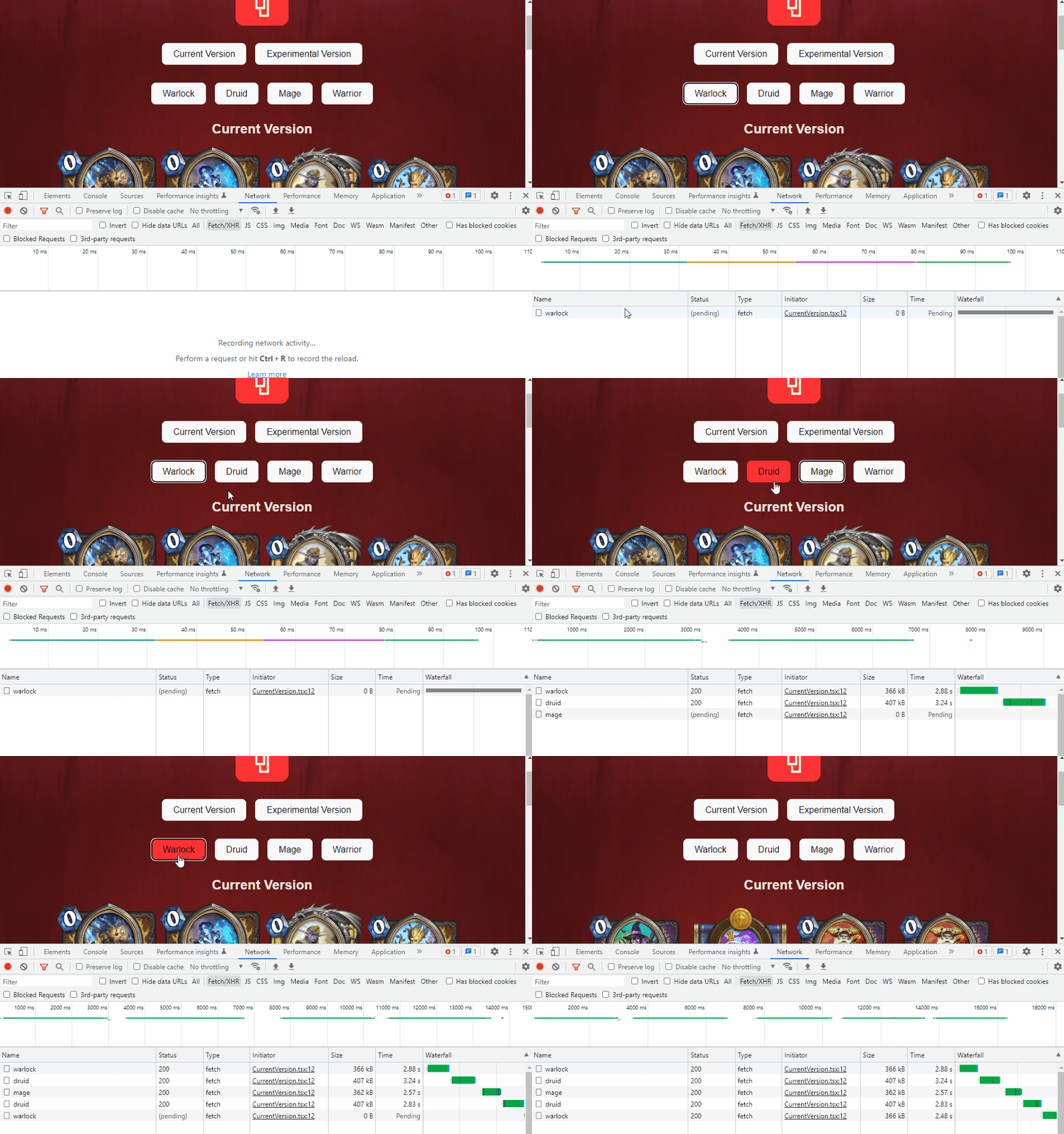
This approach requires two hooks and every time I switch between classes a new request will be made. This "monitoring" is done through useEffect "listening" to the [cardClass] parameter.
In addition to always making a new request, using useEffect can end up triggering N calls depending on the page rendering. Initially there will be two (this can be worked around but I didn't make that change in this project — it's yet another manual step).
Notice in the image below that every time I switch between each class a new request is made, regardless of whether the call had already been performed.
With use this approach can be different — I'll explain further ahead.
ExperimentalVersion
// Experimental.tsx
import { cache, use, Suspense } from "react"

interface CardsProps {
  id: string
}

interface ExperimentalVersionProps {
  cardClass: string
}

const fetchCards = cache(async (id: string) => {
  const response = await fetch(`https://omgvamp-hearthstone-v1.p.rapidapi.com/cards/classes/${id}`, {
    headers: {
      'X-RapidAPI-Key': `${import.meta.env.VITE_RAPID_API_KEY}`,
      'X-RapidAPI-Host': `${import.meta.env.VITE_RAPID_API_HOST}`
    }
  })

  const dataResponse = await response.json()

  // The filter was added to filter cards that have the `img` attribute, otherwise several cards will appear "broken" during page rendering.
  // The slice is to return only 20 cards so the display isn't too large. This was necessary since at the time this article was written the API doesn't offer the ability to specify the number of cards to return.
  return (dataResponse.filter((card: any) => card.img)).slice(0, 19)
})


function Cards({ id }: CardsProps) {
  const cards = use(fetchCards(id))

  const renderClasses = (card: any, key: number) => {
    return (
      <img key={key} src={card.img} alt={card.name} height="256px" />
    )
  }

  return (
    <div>
      {cards?.map(renderClasses)}
    </div>
  )
}


function ExperimentalVersion({ cardClass }: ExperimentalVersionProps) {
  return (
    <div>
      <h2>Experimental Version</h2>
      <Suspense fallback={<h2>Loading…</h2>}>
        <Cards id={cardClass} />
      </Suspense>
    </div>
  )
}

export default ExperimentalVersion
The approach with the use hook starts to change: the first point I described in this article is First Class Support — with this, the method to fetch cards is outside the ExperimentalVersion function, allowing a call to be made and the content read through a promise with the Suspense API.
Promise
const fetchCards = cache(async (id: string) => {
  const response = await fetch(`https://omgvamp-hearthstone-v1.p.rapidapi.com/cards/classes/${id}`, {
  // something
})
Suspense
<Suspense fallback={<h2>Loading…</h2>}>
  <Cards id={cardClass} />
</Suspense>
Notice that I also added a cache wrapper to the fetchCards function:
cache(async (id: string) => {
This way the request is "cached", so every time the same request is made the cached result will be returned without needing a new API call — unlike what happens with the approach without the cache wrapper, as shown in the image below:
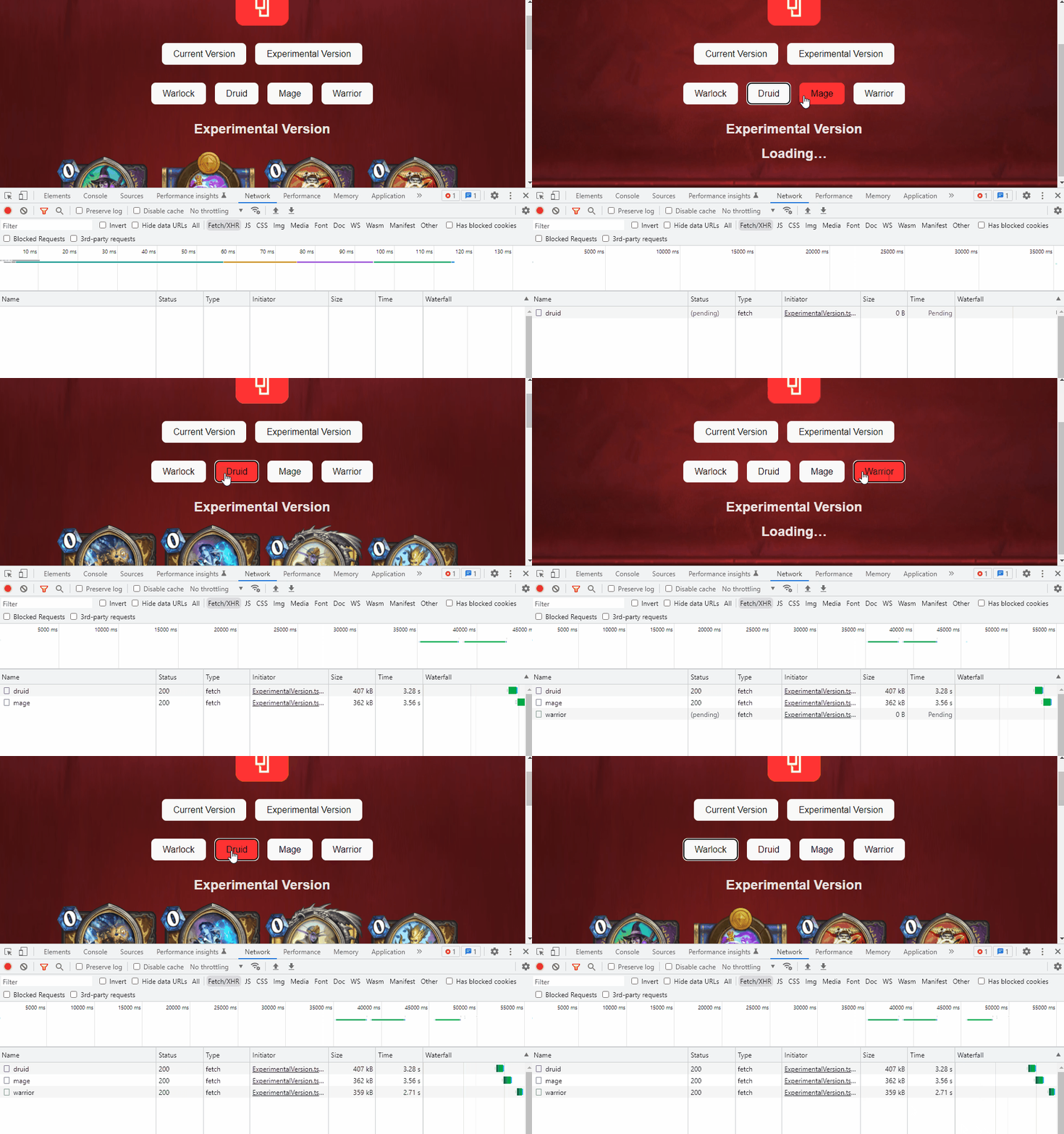
Using cache is not mandatory — for now — but it is highly recommended by the team according to the RFC. Either way, cache usage can involve various approaches, such as the need for cache invalidation or route changes.
Even so, using cache does not replace libraries like react query, which has many other features beyond just caching.
Conclusion
As can be observed, using the new hook drastically reduces the logic and number of hooks needed, making the code simpler. Plus, the possibility of combining the cache API makes asynchronous calls much more efficient.
Although not presented here, it's very important to note that this can also be applied with Server Components.
Some points are still open for the community, such as:
- How will error handling work?
- Will they add state control for
pendingandrejected? - Some people are against this approach because ReactJS is a library, not a framework.
- The cache API will still be added in a complementary RFC because it needs to be better addressed.
That's it for now — remember that this is NOT the final version of the use hook and the discussion is still open, so changes may arise over time.
Either way, the community is committed to contributing to this potential improvement and in my opinion it will be very welcome because it greatly helps in day-to-day development.
I hope you enjoyed this article — see you in the next one ;)
To view the complete project visit reactjs-use-hook
References
- https://github.com/reactjs/rfcs/pull/229
- https://github.com/acdlite/rfcs/blob/first-class-promises/text/0000-first-class-support-for-promises.md
- https://xebia.com/blog/use-hook-the-new-experimental-javascript-react-feature/
- https://www.youtube.com/watch?v=ytXM05PVcFU&ab_channel=JackHerrington
- https://vived.io/new-hook-is-coming-to-react-frontend-weekly-vol-109/
- https://17.reactjs.org/docs/concurrent-mode-suspense.html
- https://rapidapi.com/omgvamp/api/hearthstone