Herdr — where your coding agents live (and keep working when you close the terminal)

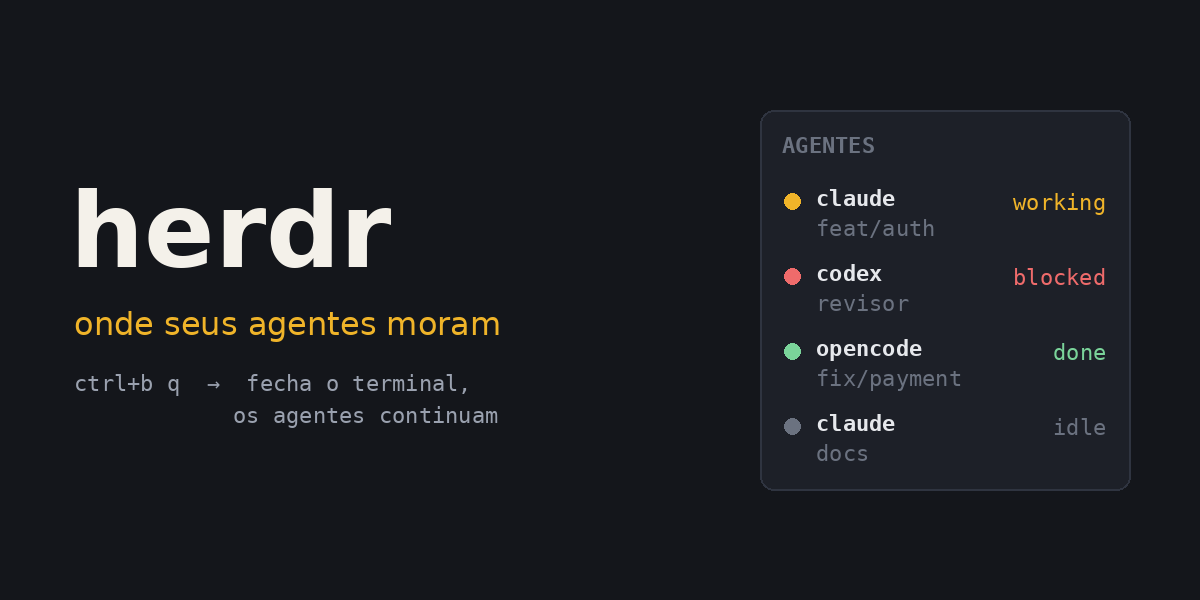
If you use coding agents often, you've probably lived this scene: three terminals open, a Claude Code implementing a feature, a Codex reviewing another branch, an OpenCode investigating a bug. You go grab a coffee. When you come back, two of them have been sitting there for 15 minutes waiting for you to approve something, and one finished a while ago without you noticing.
Or worse: you accidentally close the terminal, the SSH connection drops, and the whole session goes with it.
Herdr solves exactly that. It describes itself as "where your coding agents live": a terminal runtime that keeps agents running in the background, shows the state of each one, and exposes an API so scripts (and other agents) can control everything.
What Herdr is (in 30 seconds)
Think of a tmux built for coding agents. It's a single Rust binary, no Electron, that runs inside the terminal you already use.
What it does:
- Keeps everything running in the background. Terminals live in a local server. You close the window, lose the connection, and the agents keep working. Run
herdragain and everything is there. - Shows the state of each agent. It reads every pane and marks the agent as
working,blocked,doneoridle. No more hunting for which terminal is stuck waiting for approval. - Works with the agent you already use. More than twenty agents are supported, including Claude Code, Codex, Cursor CLI, OpenCode, Gemini and Copilot. It doesn't replace or "wrap" the agent; it just owns the terminal the agent runs in.
- Puts several machines in one window. Laptop, desktop and remote server over SSH, with all their agents side by side.
- Has a CLI and a socket API. Anything you do with the mouse you can do from a script. And the agents themselves can use that API to open panes, start other agents and wait for one to finish.
It's open source (Apache 2.0) and, at the time of writing, on version 0.9.3.
Installation
# macOS / Linux
curl -fsSL https://herdr.dev/install.sh | sh

# Homebrew
brew install herdr

# mise
mise use -g herdr
On Windows, with PowerShell:
powershell -ExecutionPolicy Bypass -c "irm https://herdr.dev/install.ps1 | iex"
Native Windows support (via ConPTY) is already stable, but the docs themselves warn that some features behave differently than on Linux and macOS.
First steps
Go to your project folder and run:
herdr
That's it. It starts the server in the background (or attaches to the one already running) and opens a workspace for the project. Inside it, run your agent as usual:
claude
Herdr detects the agent on its own and starts showing its state in the sidebar.
A few concepts worth knowing:
| Concept | What it is |
|---|---|
| Workspace | A project container. One per repository, task or investigation. |
| Tab | A layout inside the workspace: agents, logs, server, review. |
| Pane | A real terminal. It can hold a shell, a server or an agent. |
| Agent | The recognized agent running inside a pane, with a state. |
It's designed for the mouse (click, drag dividers, right-click menus), but the shortcuts follow tmux style, with the ctrl+b prefix:
| Action | Shortcut |
|---|---|
| Split right | ctrl+b v |
| Split down | ctrl+b - |
| New tab | ctrl+b c |
| Next / previous | ctrl+b n / p |
| Navigate workspaces | ctrl+b w |
| Show all shortcuts | ctrl+b ? |
| Leave without stopping anything | ctrl+b q |
ctrl+b q is the game changer. You detach, the agents keep going. To come back, run herdr again. To actually stop everything:
herdr server stop
The four states
This is the part that makes the biggest difference day to day. Each agent shows up with a state:
| State | Meaning |
|---|---|
working | It's working. |
blocked | It needs you: approval, a question, a decision. |
done | It finished and you haven't looked yet. |
idle | It finished and you've seen it, or it's waiting for input. |
With five agents running, you no longer need to check terminal by terminal. Glance at the sidebar, see who's blocked, handle just that one.
And you can get notified when an agent finishes or gets stuck. In ~/.config/herdr/config.toml:
[ui.toast]
delivery = "system"       # herdr, terminal, system or off
position = "bottom-right"
With system, the notification goes to the operating system. You can be in another window or in a meeting and still know an agent needs you.
Run herdr --default-config > ~/.config/herdr/config.toml to start from the full default configuration, and herdr server reload-config to apply changes without restarting anything.
Real example 1: one workspace per task, with worktrees
In the Claude Code post I showed how to use git worktree to run two sessions in parallel, each on its own branch. Herdr turns that into a single command:
herdr worktree create --branch feat/auth-refresh --no-focus
herdr worktree create --branch fix/payment-null --no-focus
Each command creates the branch checkout and opens a workspace for it, grouped with the repository's main workspace. Then just go into each one and run the agent.
When you're done, remove the checkout (the branch isn't deleted):
herdr worktree remove --workspace <workspace-id>
Real example 2: run tests and wait for the result
Herdr isn't only for agents. Any process can run in a pane and be observed:
herdr pane run w1:p3 "pnpm test --watch"
herdr pane wait-output w1:p3 --regex "passed|failed" --timeout 120000
wait-output blocks until the text shows up (or the timeout hits). You can use it to chain steps: start the server, wait for ready, run the integration tests.
And to read the output of any pane without looking at it:
herdr pane read w1:p3 --source recent-unwrapped --lines 120
Real example 3: a script that asks another agent for a review
This is where it gets interesting. The whole CLI returns JSON, so you can automate the entire flow with jq.
This script opens a pane next to the current one, starts a Codex as a reviewer, asks it to review the diff against main, waits for it to finish, saves the result and notifies you:
#!/usr/bin/env bash
# scripts/review.sh
set -euo pipefail

# Only works inside a Herdr pane
test "${HERDR_ENV:-}" = 1 || { echo "Run this inside Herdr."; exit 1; }

# Open a pane to the right, in the same directory, without stealing focus
split=$(herdr pane split --current --direction right --cwd "$PWD" --no-focus)
pane=$(jq -r '.result.pane.pane_id' <<< "$split")

# Start Codex in that pane with the name "reviewer"
herdr agent start reviewer --kind codex --pane "$pane"

# Send the task and wait for it to finish (up to 10 minutes)
herdr agent prompt reviewer \
  "Review the changes on this branch against main (git diff main). \
List only actionable issues: bugs, edge cases, security. \
Don't refactor anything." \
  --wait --timeout 600000

# Save the answer and notify
herdr agent read reviewer --source recent-unwrapped --lines 200 > review.md
herdr notification show "Review ready" --body "See review.md" --sound done
A few details that matter:
--no-focuskeeps you in your current pane. The reviewer works alongside without interrupting you.- IDs come from the JSON. Never try to guess the next pane will be
w1:p2; read it from the response. agent startonly returns once the agent is ready to receive a prompt. Nosleepneeded.agent prompt --waitwaits for the agent to leaveworking. If it stops atblocked(asking for approval), the command returns and you decide what to do.
And if the reviewer gets stuck asking for something, you can see what it is and respond:
herdr agent wait reviewer --until blocked --timeout 120000
herdr agent read reviewer --source recent-unwrapped --lines 80
herdr agent send-keys reviewer esc
Real example 4: one agent coordinating another
The script above works, but you can go further: the agent itself can use Herdr.
Herdr ships a skill that teaches any agent how to use the CLI:
npx skills add herdrdev/herdr --skill herdr -g
With it installed, you open Claude Code inside Herdr and ask in plain language:
Use herdr to open a Codex in a pane next to this one, named "reviewer".
When I finish this feature, ask it to review the diff against main
and bring me only the issues it finds.
Claude Code opens the pane, starts Codex, sends the prompt, waits and reads the answer. All with the same commands as the previous example.
The skill has a safety lock I like: it only works if the HERDR_ENV=1 variable is set, which only happens inside a Herdr-managed pane. An agent running outside it can't control your session.
This connects directly to what I wrote about harness engineering: a review by an agent with clean context, one that didn't watch the implementation happen, is one of the best sensors there is. With Herdr, it becomes part of the flow instead of a manual step.
Real example 5: agents on another machine
Have a server with more CPU, or a machine that stays on all day? Add it over SSH:
herdr machine add workbox --label "Build server"
That machine's workspaces and agents show up in the same window, alongside the local ones. You close your laptop, the agents on the server keep going. Open it again the next day, reconnect, and everything is there.
And the CLI works remotely too:
herdr --machine "Build server" agent list
herdr --machine "Build server" agent prompt reviewer "What's your status?" --wait --timeout 120000
Herdr doesn't store passwords or keys: it uses the SSH setup you already have.
Real example 6: surviving a restart
Detaching and reattaching loses nothing, because the processes never stop. But if the Herdr server restarts (or the machine does), the original processes die. Herdr restores the layout (workspaces, tabs, panes, directories), but not the agent's conversation.
That's what integrations are for:
herdr integration install claude
herdr integration install codex
herdr integration install opencode
With the integration installed, after a restart Herdr reopens the same session of the agent, right where it left off. You can also install them from settings, in the integrations tab, which already suggests the ones that make sense for the agents found on your PATH.
Real example 7: a plugin with a shortcut
If you run the review script all the time, it's worth turning it into a plugin with a keyboard shortcut. A plugin is a folder with a manifest and an executable:
review-plugin/
  herdr-plugin.toml
  review.sh
# herdr-plugin.toml
id = "tautorn.review"
name = "Review"
version = "0.1.0"
min_herdr_version = "0.7.0"
platforms = ["linux", "macos"]

[[actions]]
id = "review-diff"
title = "Request a diff review"
contexts = ["workspace"]
command = ["bash", "review.sh"]
review.sh is almost the same script as example 3, with three tweaks for the plugin context:
#!/usr/bin/env bash
# review.sh
set -euo pipefail
herdr="$HERDR_BIN_PATH"   # the running Herdr binary

# No --current and no --cwd: the plugin runs in its own folder, not the project's.
# With no target, split uses the focused pane, and the new pane inherits its directory.
split=$("$herdr" pane split --direction right --no-focus)
pane=$(jq -r '.result.pane.pane_id' <<< "$split")

"$herdr" agent start reviewer --kind codex --pane "$pane"
"$herdr" agent prompt reviewer \
  "Review the changes on this branch against main (git diff main). \
List only actionable issues: bugs, edge cases, security." \
  --wait --timeout 600000

"$herdr" notification show "Review ready" --body "See the reviewer pane" --sound done
The tweaks: the binary comes from HERDR_BIN_PATH, the split uses neither --current nor --cwd (the plugin process runs in the plugin's folder, not the project's), and the result stays in the reviewer's pane instead of a file. To test it locally:
herdr plugin link ./review-plugin
And the shortcut, in config.toml:
[[keys.command]]
key = "prefix+r"
type = "plugin_action"
command = "tautorn.review.review-diff"
description = "request review"
Now ctrl+b r triggers the review. There's a marketplace with over a thousand ready-made plugins, worth a look before writing your own.
Things to watch out for
Closing the laptop isn't closing the terminal. If the agents run on your machine and it goes to sleep, they stop with it. For work that needs to continue with the laptop closed, run the agents on a machine that stays on and connect with herdr machine add.
Restart isn't detach. Detaching keeps everything alive. Restarting the server or the machine kills the processes; the layout comes back, and the conversation only comes back if you installed the agent's integration. Dev servers and tests in watch mode need to be started again.
Every agent spends tokens. Five agents in parallel means five times the usage. Parallelizing is great for independent tasks; for tasks that depend on each other, you just multiply cost and merge conflicts.
Don't automate approvals. You can answer a blocked agent with send-keys, but blocked exists precisely so you can decide. A script that approves everything automatically turns off the main protection you have.
An agent controlling agents widens its reach. An agent with the Herdr skill can start other agents, run commands in other panes and read their output. That's powerful, and it's exactly why the permissions and sandbox of the main agent matter even more.
It's still version 0.x. It's a new project and it moves fast. Read the changelog before updating, especially if you have scripts using the API.
Conclusion
Herdr doesn't make any agent smarter. What it changes is the environment around them:
- Agents survive you closing the terminal or losing the connection.
- You know who needs you without checking terminal by terminal.
- Worktree, pane and agent become one command instead of three terminals and a
cd. - Everything is scriptable, including by another agent.
- Several machines show up in one window.
If you run one agent at a time, you probably don't need it. If you've caught yourself with three or four agents open and losing track of who's doing what, it's well worth trying.