jsdom or happy-dom? Pros, cons and a benchmark you can reproduce

Every front-end project using Vitest reaches this question at some point: environment: 'jsdom' or environment: 'happy-dom'?
The answer you usually find is "happy-dom is 2 to 4 times faster". I went looking for where that number comes from and, in most articles, it has no code, no methodology and no versions. So I decided to measure it.
I built a suite with 240 React component tests and ran it in both environments, under different Vitest configurations, several times. I also checked 20 browser APIs and behaviors in both to see what each one actually implements. The result has a surprise: Vitest's configuration matters more than the choice of library.
What they do
Neither of them is a browser. Both are DOM implementations in pure JavaScript, built to run on Node. Your test calls document.querySelector, element.click(), addEventListener, and something has to answer. That's what they do.
- jsdom: the veteran. It's been around for over 15 years, it's Jest's traditional DOM environment and it closely follows the WHATWG specs. Its focus is being correct.
- happy-dom: newer, built with a focus on speed for testing. It implements several APIs jsdom doesn't have, sometimes in a simplified way.
What neither of them does: layout. There's no calculation of element position and size. getBoundingClientRect() returns all zeros in both, and jsdom's README says it plainly: layout and navigation are out of the project's scope.
Versions used in this article: jsdom 30.1.1, happy-dom 20.14.5, Vitest 5.0.3, React 19.3, Testing Library 16.3, Node 22.
The benchmark
Methodology
To be useful, the benchmark had to look like a real project, not a createElement loop. So:
- 5 common React components: a login form with validation, a to-do list with filters, a 300-row table with search and sorting, a modal with a portal and focus handling, and tabs with keyboard navigation.
- 8 tests covering those components with Testing Library and
user-event(typing, clicking, keyboard). - 30 test files with that same suite, 240 tests in total. Many files is the scenario where the cost of creating the environment shows up.
- 5 runs of each combination, alternating the order between jsdom and happy-dom every round.
- Machine: 2 vCPUs (Intel Xeon 2.1 GHz), 8 GB of RAM, Linux.
All 240 tests passed in both environments, on every run. That matters: a benchmark where one side fails isn't worth anything.
The full code is on GitHub: Tautorn/jsdom-vs-happy-dom-bench. To run it on your machine, just npm install and npm run bench.
A snippet of the tests, to give you an idea:
it('filters by search', async () => {
  const user = userEvent.setup()
  render(<DataTable rows={rows} />)
  await user.type(screen.getByLabelText('buscar'), 'Pessoa 29')
  expect(screen.getByText('10 resultados')).toBeInTheDocument()
})
Results
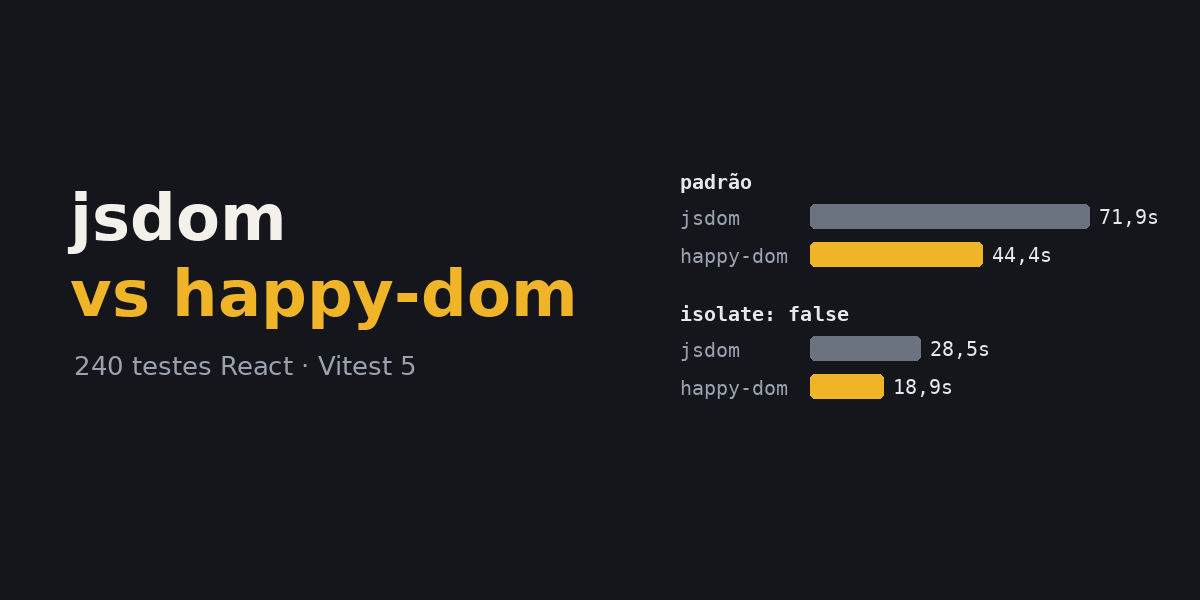
Median of 5 runs, total time reported by Vitest:
| Vitest configuration | jsdom | happy-dom | Difference |
|---|---|---|---|
| Default (per-file isolation) | 71.9 s | 44.4 s | happy-dom 1.6x faster |
isolate: false | 28.5 s | 18.9 s | happy-dom 1.5x faster |
Variation between runs was small: in the worst case, under 1.3 seconds between the fastest and the slowest.
Three takeaways:
1. happy-dom is faster, but not 4x. On a suite with real components, the difference was 1.5x to 1.6x. The "4x" numbers going around usually come from microbenchmarks, not real tests.
2. A large part of the difference is environment creation. In default mode, Vitest creates a fresh environment for each test file. Vitest itself reported that creating jsdom took 28% of the suite's time, versus 19% for happy-dom. With isolate: false, that drops to 2% and 1%.
3. Configuration matters more than the library. Look at the table again: jsdom with isolate: false (28.5 s) was faster than happy-dom in default mode (44.4 s). If your problem is CI time, changing Vitest's configuration pays off more than switching libraries. And you can do both.
// vitest.config.js
export default defineConfig({
  test: {
    environment: 'happy-dom',
    isolate: false, // reuses the environment across files
  },
})
isolate: false makes test files share the same environment. If a test leaves global state behind (a mock that wasn't restored, dirty localStorage, a dangling timer), another file can break or, worse, pass by accident. It works well in disciplined suites with cleanup and vi.restoreAllMocks(). Try it before turning it on in CI.
Microbenchmarks
I also measured a few isolated operations, outside Vitest:
| Operation | jsdom | happy-dom |
|---|---|---|
| Import the library | 537 ms | 262 ms |
Create a window/document | 6.3 ms | 2.3 ms |
innerHTML of a 2,000-row table | 176 ms | 159 ms |
createElement + appendChild x1,000 | 5.3 ms | 9.6 ms |
Read the table's textContent | 1.5 ms | 2.9 ms |
Notice happy-dom doesn't win everything. Creating elements and reading text were faster in jsdom. Where happy-dom wins comfortably is exactly what repeats most in a suite: loading the library and creating the environment.
Two microbenchmarks were left out because the results weren't reliable: querySelectorAll varied too much between runs in happy-dom, and the events test was unintentionally measuring link navigation in jsdom. I'd rather show fewer numbers than wrong numbers.
Compatibility: what each one implements
Speed doesn't help if the test doesn't run. I checked 20 APIs and behaviors in both environments:
| API / behavior | jsdom | happy-dom |
|---|---|---|
getComputedStyle reading CSS from <style> | ✅ | ✅ |
:has() selector | ✅ | ✅ |
Form validation (checkValidity, validity) | ✅ | ✅ |
| Submit blocked by an invalid field | ✅ | ✅ |
valueAsNumber on type="number" | ✅ | ✅ |
| Custom Elements + Shadow DOM | ✅ | ✅ |
MutationObserver | ✅ | ✅ |
Range / Selection | ✅ | ✅ |
innerText | ❌ | ✅ |
dialog.showModal() | ❌ | ✅ |
matchMedia | ❌ | ✅ |
ResizeObserver | ❌ | ✅ |
IntersectionObserver | ❌ | ✅ |
element.animate() | ❌ | ✅ |
element.scrollIntoView() | ❌ | ✅ |
navigator.clipboard | ❌ | ✅ |
fetch on window | ❌ | ✅ |
Clicking a <label> focuses the input | ❌ | ❌ |
getBoundingClientRect with real size | ❌ | ❌ |
canvas.getContext('2d') | ❌ | ❌ |
That busts another myth: happy-dom isn't "less complete" across the board. By number of available APIs, it has more. matchMedia, ResizeObserver and IntersectionObserver are exactly the APIs every jsdom project ends up mocking by hand:
// The mock every jsdom project has somewhere
Object.defineProperty(window, 'matchMedia', {
  value: vi.fn().mockImplementation((query) => ({
    matches: false,
    media: query,
    addEventListener: vi.fn(),
    removeEventListener: vi.fn(),
  })),
})
But read that table carefully: existing isn't the same as working like a browser. Without layout, happy-dom's IntersectionObserver has no way of knowing whether an element is actually visible. ResizeObserver has no real size to report. The API is there, the test doesn't break, but the behavior is simplified.
jsdom goes the opposite way: it implements less, but what it implements closely follows the spec. A good example came up while I was building the benchmark. My form had type="email", and the test that typed an invalid e-mail failed in jsdom: the browser blocks submitting an invalid type="email" field before calling your onSubmit, and jsdom did exactly the same. My test was wrong, not jsdom. (happy-dom also blocked it, in the isolated check.)
Security: a point for jsdom
In 2025 happy-dom had a serious vulnerability, CVE-2025-61927: JavaScript running inside the environment could escape the VM context and execute code in the Node process. It affected every version up to 19, and the fix in v20 was to disable JavaScript evaluation by default.
For component tests this barely changes anything, because your test code runs normally. What changes is that scripts inside HTML (a <script> in an innerHTML, for example) no longer execute unless you turn on the enableJavaScriptEvaluation option.
Two practical recommendations:
- If you use happy-dom, be on v20 or newer.
- Don't use either one to process third-party HTML with scripts enabled. jsdom's own README warns that running untrusted code with
runScriptsis, in practice, running untrusted code in Node.
When to use each one
Use happy-dom when:
- The suite is large, with many files, and CI time bothers you.
- They're typical component tests: render, click, type, check text and attributes.
- You're tired of mocking
matchMedia,ResizeObserverandIntersectionObserver. - Your components use
dialog.showModal()orinnerText.
Use jsdom when:
- You need behavior as close to the spec as possible, as in component libraries, complex forms and accessibility.
- You already have a large, stable suite on jsdom. Migrating just for speed can bring subtle failures, and
isolate: falsemight already solve your time problem. - The project uses Jest, where jsdom is the default and most tested path.
- You're scraping or processing HTML on the server, where fidelity matters more than speed.
Use neither when the test depends on layout, real scrolling, visually applied CSS, canvas or animation. That belongs in a real browser: Vitest Browser Mode or Playwright.
You can mix them
You don't have to pick one for the whole project. Vitest lets you switch the environment per file, with a comment at the top:
// @vitest-environment jsdom
import { render } from '@testing-library/react'
// this file runs on jsdom, the rest of the project on happy-dom
A strategy that works well: happy-dom as the default for speed, and jsdom in the files that test something where fidelity matters.
Migrating from jsdom to happy-dom
If you decide to try it:
npm i -D happy-dom
// vitest.config.js
export default defineConfig({
  test: { environment: 'happy-dom' },
})
And run the suite. What usually shows up:
- Mocks that became unnecessary. The ones for
matchMedia,ResizeObserverandIntersectionObservercan go, but check whether the test depends on the mocked behavior. - Differences in text and whitespace.
innerTextandtextContentcan normalize whitespace differently. Prefer Testing Library matchers (toHaveTextContent) over comparing exact strings. - Tests that were passing by accident. Any behavior difference exposes fragile tests. Fix the test; don't go back to jsdom on autopilot.
If a specific file doesn't adapt, put the // @vitest-environment jsdom comment on it and move on.
Conclusion
- happy-dom is faster, about 1.5x on a real React component suite. Not 4x.
- Most of the gain comes from creating the environment, which repeats for every test file.
isolate: falsepays off more than switching libraries: jsdom without isolation was faster than happy-dom with isolation.- happy-dom has more APIs; jsdom is more faithful in what it implements. Choose based on what your tests use.
- Neither does layout. For that, use a real browser.
- If you use happy-dom, use v20+.
My pick for a new Vitest project: happy-dom as the default, isolate: false if the suite is disciplined, and jsdom per file when needed. For an existing jsdom project, I'd start by trying isolate: false before migrating anything.
And be suspicious of benchmarks without methodology, including mine. Every suite is different. The code is here: run it on your machine, swap the components for yours and see what happens.